MathArcsinh
MathArcsinh
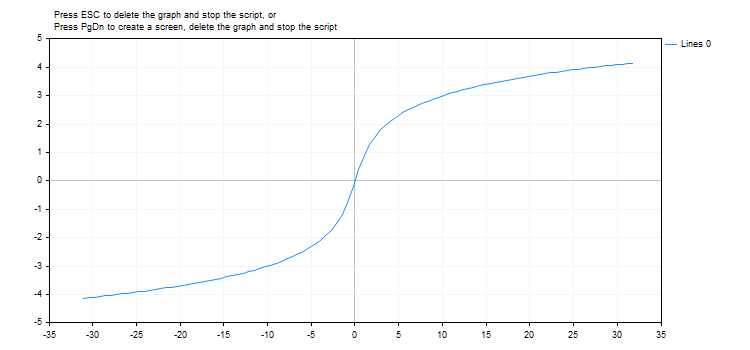
返回双曲反正弦。
double  MathArcsinh(
   double  value      // -∞ < 值 < +∞
   );
参数
- val
[in] 将被计算双曲反正弦的值。
返回值
数值的双曲反正弦。
注意
您可以使用asinh()函数,代替MathArcsinh()函数。
示例:
#define GRAPH_WIDTH  750
#define GRAPH_HEIGHT 350

#include <Graphics\Graphic.mqh>

CGraphic ExtGraph;
//+------------------------------------------------------------------+
//| 脚本程序起始函数                                                   |
//+------------------------------------------------------------------+
void OnStart()
  {
   vector delta=vector::Full(101,2*M_PI/10);
   delta[0]=-31;
//--- 获取从-31到2pi的101个值,步长为delta
   vector X=delta.CumSum();
//--- 计算X向量每个值的双曲反正弦值
   vector Y=MathArcsinh(X);

//--- 将计算值从向量转移到数组
   double x_array[],y_array[];
   X.Swap(x_array);
   Y.Swap(y_array);

//--- 绘制计算出的向量值的图形
   CurvePlot(x_array,y_array,clrDodgerBlue);

//--- 等待按下Escape或PgDn键删除图形(截取屏幕截图)并退出
   while(!IsStopped())
     {
      if(StopKeyPressed())
         break;
      Sleep(16);
     }

//--- 清除
   ExtGraph.Destroy();
  }
//+------------------------------------------------------------------+
//| When pressing ESC, return 'true'                                 |
//| When pressing PgDn, take a graph screenshot and return 'true'    |
//| Otherwise, return 'false'                                        |
//+------------------------------------------------------------------+
bool StopKeyPressed()
  {
//--- 如果按下ESC,则返回'true'
   if(TerminalInfoInteger(TERMINAL_KEYSTATE_ESCAPE)!=0)
      return(true);
//--- 果按下PgDn,并且成功抓取图形屏幕截图,则返回'true'
   if(TerminalInfoInteger(TERMINAL_KEYSTATE_PAGEDOWN)!=0 && MakeAndSaveScreenshot(MQLInfoString(MQL_PROGRAM_NAME)+"_Screenshot"))
      return(true);
//--- 返回'false'
   return(false);
  }
//+------------------------------------------------------------------+
//| Create a graph object and draw a curve                           |
//+------------------------------------------------------------------+
void CurvePlot(double &x_array[], double &y_array[], const color colour)
  {
   ExtGraph.Create(ChartID(), "Graphic", 0, 0, 0, GRAPH_WIDTH, GRAPH_HEIGHT);
   ExtGraph.CurveAdd(x_array, y_array, ColorToARGB(colour), CURVE_LINES);
   ExtGraph.IndentUp(30);
   ExtGraph.CurvePlotAll();
   string text1="Press ESC to delete the graph and stop the script, or";
   string text2="Press PgDn to create a screen, delete the graph and stop the script";
   ExtGraph.TextAdd(54, 9, text1, ColorToARGB(clrBlack));
   ExtGraph.TextAdd(54,21, text2, ColorToARGB(clrBlack));
   ExtGraph.Update();
  }
//+------------------------------------------------------------------+
//| Take a screenshot and save the image to a file                   |
//+------------------------------------------------------------------+
bool MakeAndSaveScreenshot(const string file_name)
  {
   string file_names[];
   ResetLastError();
   int selected=FileSelectDialog("Save Picture", NULL, "All files (*.*)|*.*", FSD_WRITE_FILE, file_names, file_name+".png");
   if(selected<1)
     {
      if(selected<0)
         PrintFormat("%s: FileSelectDialog() function returned error %d", __FUNCTION__, GetLastError());
      return false;
     }

   bool res=false;
   if(ChartSetInteger(0,CHART_SHOW,false))
      res=ChartScreenShot(0, file_names[0], GRAPH_WIDTH, GRAPH_HEIGHT);
   ChartSetInteger(0,CHART_SHOW,true);
   return(res);
  }
结果: