CPieChart
CPieChart
Class for plotting pie charts.
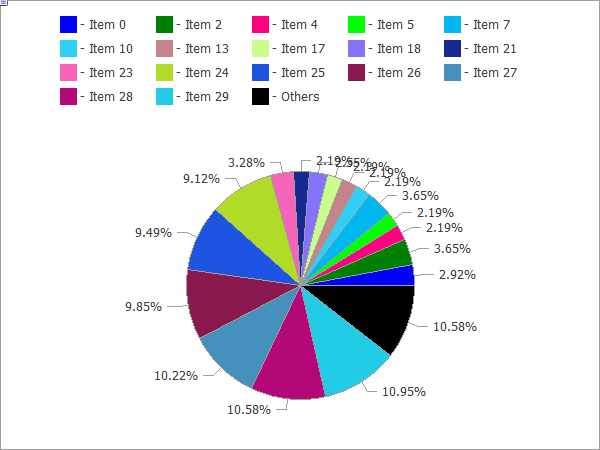
The code of the above figure is provided below.
Description
The methods included in this class are designed for full-scale operation with pie charts, from the creating a graphical resource to designing labels to segments.
Declaration
class CPieChart : public CChartCanvasTitle
#include <Canvas\Charts\PieChart.mqh>Inheritance hierarchy
CPieChart
Class methods
| Method | Action |
|---|---|
| Create | Virtual method that creates a graphical resource. |
| SeriesSet | Sets a series of values that will be shows on the pie chart. |
| ValueAdd | Adds a new value to the pie chart (to the end). |
| ValueInsert | Inserts a new value to the pie chart (at the specified position). |
| ValueUpdate | Updates the value on the pie chart (at the specified position). |
| ValueDelete | Removes a value from the pie chart (at the specified position). |
| DrawChart | Virtual method which draws a pie chart and all its elements. |
| DrawPie | Draws a segment of the pie chart, which corresponds to a specified value. |
| LabelMake | Generates a segment label based on its value and the original label. |
Methods inherited from class CChartCanvas
: ColorBackground, ColorBackground, ColorBorder, ColorBorder, ColorText, ColorText, ColorGrid, ColorGrid, MaxData, MaxData, MaxDescrLen, MaxDescrLen, AllowedShowFlags, ShowFlags, ShowFlags, IsShowLegend, IsShowScaleLeft, IsShowScaleRight, IsShowScaleTop, IsShowScaleBottom, IsShowGrid, IsShowDescriptors, IsShowPercent, ShowLegend, ShowScaleLeft, ShowScaleRight, ShowScaleTop, ShowScaleBottom, ShowGrid, ShowDescriptors, ShowValue, ShowPercent, LegendAlignment, Accumulative, VScaleMin, VScaleMin, VScaleMax, VScaleMax, NumGrid, NumGrid, VScaleParams, DataOffset, DataOffset, DataTotal, DescriptorUpdate, ColorUpdate
Example
//+------------------------------------------------------------------+
//|                                               PieChartSample.mq5 |
//|                   Copyright 2009-2017, MetaQuotes Software Corp. |
//|                                              http://www.mql5.com |
//+------------------------------------------------------------------+
#property copyright   "2009-2017, MetaQuotes Software Corp."
#property link        "http://www.mql5.com"
#property description "Example of using pie chart"
//---
#include <Canvas\Charts\PieChart.mqh>
//+------------------------------------------------------------------+
//| inputs                                                           |
//+------------------------------------------------------------------+
input int      Width=600;
input int      Height=450;
//+------------------------------------------------------------------+
//| Script program start function                                    |
//+------------------------------------------------------------------+
int OnStart(void)
  {
//--- check
   if(Width<=0 || Height<=0)
     {
      Print("Too simple.");
      return(-1);
     }
//--- create chart
   CPieChart pie_chart;
   if(!pie_chart.CreateBitmapLabel("PieChart",10,10,Width,Height))
     {
      Print("Error creating pie chart: ",GetLastError());
      return(-1);
     }
   pie_chart.ShowPercent();
//--- draw
   for(uint i=0;i<30;i++)
     {
      pie_chart.ValueAdd(100*(i+1),"Item "+IntegerToString(i));
      Sleep(10);
     }
   Sleep(2000);
//--- disable legend
   pie_chart.LegendAlignment(ALIGNMENT_LEFT);
   Sleep(2000);
//--- disable legend
   pie_chart.LegendAlignment(ALIGNMENT_RIGHT);
   Sleep(2000);
//--- disable legend
   pie_chart.LegendAlignment(ALIGNMENT_TOP);
   Sleep(2000);
//--- disable legend
   pie_chart.ShowLegend(false);
   Sleep(2000);
//--- disable percentage
   pie_chart.ShowPercent(false);
   Sleep(2000);
//--- disable descriptors
   pie_chart.ShowDescriptors(false);
   Sleep(2000);
//--- enable all
   pie_chart.ShowLegend();
   pie_chart.ShowValue();
   pie_chart.ShowDescriptors();
   Sleep(2000);
//--- or like this
   pie_chart.ShowFlags(FLAG_SHOW_LEGEND|FLAG_SHOW_DESCRIPTORS|FLAG_SHOW_PERCENT);
   uint total=pie_chart.DataTotal();
//--- play with values
   for(uint i=0;i<total && !IsStopped();i++)
     {
      pie_chart.ValueUpdate(i,100*(rand()%10+1));
      Sleep(1000);
     }
//--- play with colors
   for(uint i=0;i<total && !IsStopped();i++)
     {
      pie_chart.ColorUpdate(i%total,RandomRGB());
      Sleep(1000);
     }
//--- rotate
   while(!IsStopped())
     {
      pie_chart.DataOffset(pie_chart.DataOffset()+1);
      Sleep(200);
     }
//--- finish
   pie_chart.Destroy();
   return(0);
  }
//+------------------------------------------------------------------+
//| Random RGB color                                                 |
//+------------------------------------------------------------------+
uint RandomRGB(void)
  {
   return(XRGB(rand()%255,rand()%255,rand()%255));
  }